
Key facts
- Brand
- au by KDDI
- Model
- W42S
- Category
- Cell Phones
- Documents
- 2
- Languages
- ZH
- Last added
- 2012-03-28
Start here
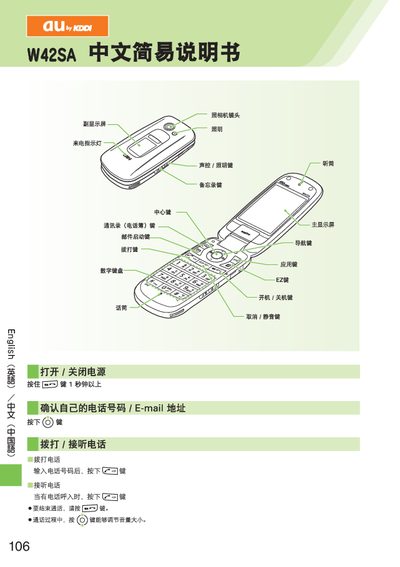
au by KDDI W42SA User Manual
This manual explains how to power the device on and off, place and receive calls, and adjust call volume. It also covers adding, viewing, and editing entries in the address book.
Additional sections describe how to set up and use EZweb email, C‑mail, browse the Internet with EZweb, operate the built‑in camera for photos and video, make international calls, and enable or disable silent and voicemail modes. This manual is written in Chinese.
All au by KDDI W42S documents by type
Day-to-day operation, settings and troubleshooting. Start here if the product is already set up.
Questions answered in these manuals
How do I turn the phone on?
Press and hold the power button for more than one second.
From: au W42S User Manual
How can I send an email?
From the standby screen press the mail key, then select “New Mail” and follow the prompts to enter the recipient, subject and body.
From: au W42S User Manual
How do I make a phone call?
Enter the telephone number and press the call key to start the call.
How can I answer an incoming call?
When a call comes in, press the answer key to answer the call.