
Key facts
- Brand
- au by KDDI
- Model
- W61S
- Category
- Telephone
- Documents
- 2
- Languages
- ZH
- Last added
- 2012-03-28
Start here
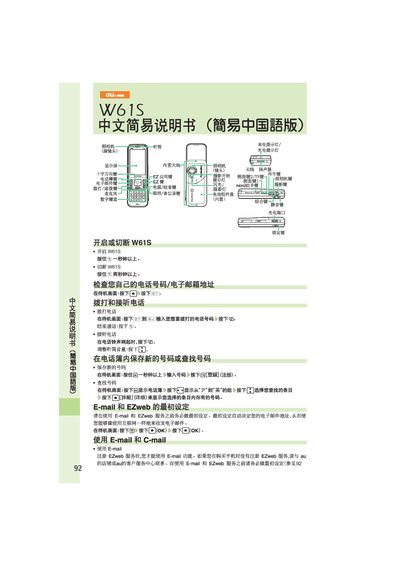
au W61S Phone User Manual
This manual explains how to power the au W61S on and off, make and receive calls, and manage the phonebook. It also covers the initial setup for E‑mail, C‑mail and EZweb services, including how to create, send and read messages.
Additional sections describe how to use the built‑in camera, place international calls, and configure voice mail and sound modes. The guide is written in simplified Chinese and includes button‑press sequences for each operation. This manual is written in Chinese.
All au by KDDI W61S documents by type
Day-to-day operation, settings and troubleshooting. Start here if the product is already set up.
Questions answered in these manuals
How do I turn on the au W61S phone?
Press and hold the power button for more than one second.
How do I turn off the au W61S phone?
Press and hold the power button for more than two seconds.
How do I enable mute mode on the au W61SA?
Press and hold the mute button for more than one second to activate mute mode.
From: au W61SA User Manual
How do I cancel mute mode?
Press and hold the mute button for more than one second again to turn mute mode off.
From: au W61SA User Manual