
Menu reference for an RFID reader covering configuration, date and time, EIC/CIC format, session, equivalence, sounds, brightness and keyboard test.
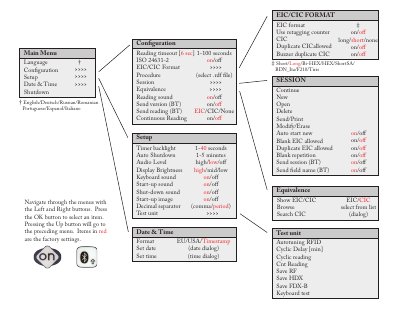
This page shows the menu structure of an RFID reader and the settings available in each branch. The menus cover Configuration, Setup, Date & Time, EIC/CIC Format, Session, Equivalence and Test unit, with sub-items such as shutdown, reading timeout, ISO 24631-2, reading sound, timer backlight, audio level, display brightness, start-up image, decimal separator, retagging counter and duplicate CIC handling. Several entries have Bluetooth send options, including sending the version, reading, session and field name.
The page also explains how to move around the menus: the Left and Right buttons navigate, the OK button selects an item, and the Up button returns to the preceding menu. Settings shown in red are the factory settings. Language options listed for the interface are English, Deutsch, Russian, Romanian Portuguese, Espanol and Italiano.
| Menu languages | English, Deutsch, Russian, Romanian Portuguese, Espanol, Italiano |
|---|---|
| Reading timeout range | 1-100 seconds |
| Cyclic delay range | 1-5 minutes |
| Decimal separator options | comma or period |
| Referenced standard | ISO 24631-2 |
Use the Left and Right buttons to move through the menus and press OK to select an item; the Up button goes to the preceding menu.
Items displayed in red are the factory settings.
English, Deutsch, Russian, Romanian Portuguese, Espanol and Italiano are listed.
The menu offers separate Bluetooth send items for the version, a reading, a session and the field name.