
RAE Systems ToxiRAE Pro CO2 Gas Monitor QuickStart Guide

QuickStart Guide for the RAE Systems ToxiRAE Pro CO2 gas monitor, covering operation, charging, and calibration.
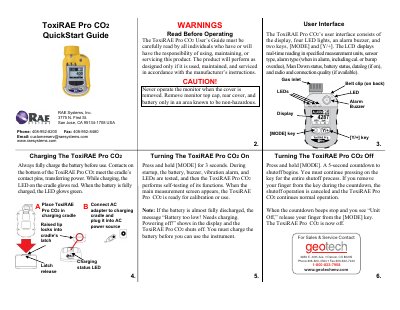

RAE Systems ToxiRAE Pro CO2 Gas Monitor QuickStart Guide - cover page
Brand
RAE Systems
Category
sensor
Document type
Quick Start Guide
Language
English
Pages
2
File format
PDF
File size
289 KB
Published
16 November, 2026
Updated
16 November, 2026
MD5 checksum
93F8386DC589BC05B738DF356895EDD9

About this manual

The ToxiRAE Pro CO2 is a gas monitor designed for CO2 detection. Its user interface includes an LCD display, four LED lights, an alarm buzzer, and two keys ([MODE] and [Y/+]) to manage real-time readings, alarm status, and battery levels.

The device supports both automatic calibration via the AutoRAE 2 station and manual calibration using a fixed-flow regulator. It features a charging cradle and a built-in datalogging function.

What's inside

  • User Interface
  • Charging
  • Turning The ToxiRAE Pro CO 2 On
  • Turning The ToxiRAE Pro CO 2 Off
  • Calibration
  • Zero (Fresh Air) Calibration
  • Manual Span Calibration
  • Bump (Functional) Testing
  • Menu Navigation

Specifications

Calibration Gas Concentration5000 ppm CO2
Manual Calibration Flow Rate0.5 to 1.0 liters per minute

Frequently asked questions

How do I turn on the ToxiRAE Pro CO2?

Press and hold the [MODE] key for 3 seconds.

What is the default password for Programming Mode?

The default password is "0000".

How can I tell when the battery is fully charged?

The LED on the charging cradle will glow green when the battery is fully charged.

Download PDF (289 KB)

More RAE Systems Manuals


View all RAE Systems manuals →