
RAE Systems ToxiRAE 3 QuickStart Guide

ToxiRAE 3 User Guide, introduces the product's usage methods
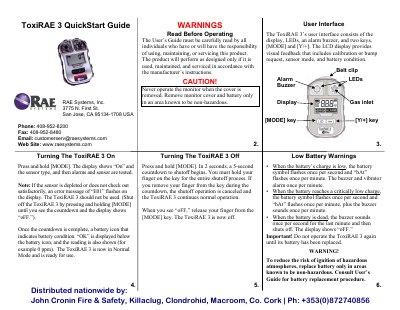

RAE Systems ToxiRAE 3 QuickStart Guide - cover page
Brand
RAE Systems
Category
Other Electronics
Document type
Quick Start Guide
Language
English
Pages
2
File format
PDF
File size
126 KB
Published
20 October, 2023
Updated
20 October, 2023
MD5 checksum
CC18B78EF3BAC6EB31D0856266EC2EDD

About this manual

This document serves as a QuickStart Guide for the RAE Systems ToxiRAE 3 portable gas monitor. It details the user interface components, including the display, LEDs, alarm buzzer, and keys. The guide provides step-by-step instructions for turning the device on and off, interpreting low battery warnings, and understanding the visual and auditory alarm signals.

What's inside

  • User Interface
  • Turning The ToxiRAE 3 On
  • Turning The ToxiRAE 3 Off
  • Low Battery Warnings
  • Programming Mode
  • Zero Calibration
  • Span Calibration
  • Bump Testing
  • Normal Mode Screens
  • Using With AutoRAE Lite

Frequently asked questions

What does the error message E01 indicate?

The error message E01 flashes if the sensor is depleted or does not check out satisfactorily, meaning the device should not be used.

What happens when the battery is critically low?

The battery symbol flashes once per second, bAt flashes once per minute, and the buzzer sounds once per minute.

Download PDF (126 KB)

More RAE Systems Manuals


View all RAE Systems manuals →