
Keyence VT3 / VT2 Connection Cable Instructions

Keyence VT3 / VT2 connection cable instructions listing custom cable numbers and connection diagrams for KZ/KV computer link and programming console port…
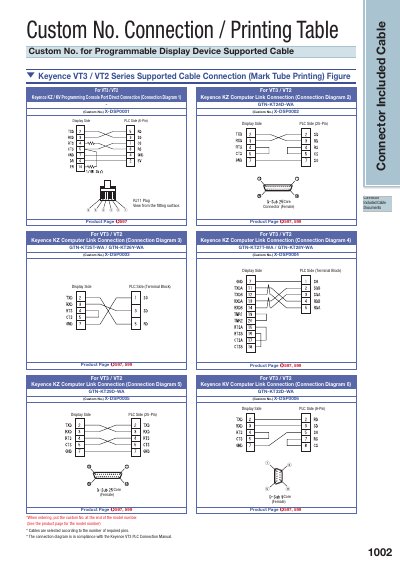

Keyence VT3 / VT2 Connection Cable Instructions - cover page
Brand
KEYENCE
Category
Cable Set
Document type
Product Leaflet
Language
English
Pages
1
File format
PDF
File size
73 KB
Published
20 November, 2026
Updated
20 November, 2026
MD5 checksum
2AAD355EDC70BBDDA5CB6C87FF080A45

About this manual

This document describes supported cable connections for Keyence VT3 / VT2 series devices. It lists custom cable numbers, connection diagrams, and compatible models for Keyence KZ and KV computer link connections as well as programming console port direct connections.

What's inside

  • Keyence VT3 / VT2 Series Supported Cable Connection
  • Custom No. Connection / Printing Table
  • Keyence KZ Computer Link Connection
  • Keyence KV Computer Link Connection
  • Keyence KV Programming Console Port Direct Connection
  • RJ11 Plug View from the fitting surface
  • Product Page a597, 599

Specifications

Computer Link Connector (25-Pin)Female
Computer Link Connector (Terminal Block)Terminal Block
Computer Link Connector (9-Pin)Female
Programming Console Port Connector6-Pin
Plug TypeRJ11 Plug

Frequently asked questions

How are cables selected?

Cables are selected according to the number of required pins.

What should be done when ordering?

Put the custom No. at the end of the model number.

What custom number applies to GTN-KT24D-WA?

The custom number is X-DSP0002.

Download PDF (73 KB)

More KEYENCE Manuals


View all KEYENCE manuals →