
User manual for the HD 1280X720P remote video camera, covering features, operation, charging, and specifications.
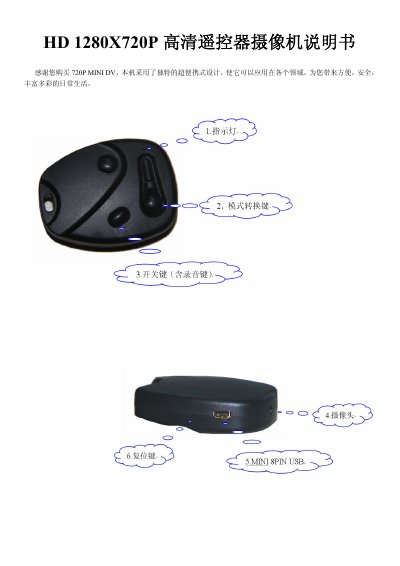
This manual introduces the HD 1280X720P remote video camera, highlighting its compact design, USB2.0 high‑speed transfer, support for up to 64 GB TF cards, and built‑in lithium battery that provides about one hour of recording. It explains how to charge the device, start and stop video recording, capture photos, and adjust video formats via a TXT file.
The guide also details connections to a TV via TV‑OUT, using the camera as a PC webcam, resetting the unit, and provides a full list of technical specifications such as supported video resolutions, frame rates, battery details, and compatible operating systems. This manual is written in Chinese.
| Video format | AVI |
|---|---|
| Video coding | M‑JPEG |
| Video resolution | 1280 × 720P HD, 720 × 480 D1, 640 × 480 VGA |
| Video frame rate | 30 fps |
| Image format | JPG |
| Image pixel | 8 M Pix |
| Image aspect ratio | 4:3 |
| Supported operating systems | Windows 98/ME/2000/XP/2003/Vista, Mac OS, Linux |
| Battery capacity | 260 mAh |
| Working time (recording) | ≈ 60 minutes |
| Battery voltage | DC 5 V |
| Interface type | 8‑Pin Mini‑USB |
| Maximum TF card capacity | 64 GB |
The camera supports TF cards up to 64 GB.
Press the reset button with a fine rod; the reset hole is located between the USB port and the TF‑card slot.