
Instruction manual for the FrSky XMR receiver, covering specifications, binding, and failsafe setup.
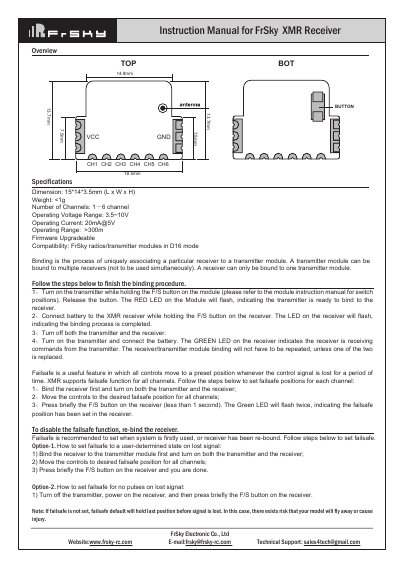
The FrSky XMR is a compact receiver with dimensions of 15*14*3.5mm and a weight of less than 1g. Its specifications include an operating voltage range of 3.5~10V, operating current of 20mA@5V, and an operating range of more than 300m.
The manual describes binding the receiver to a FrSky transmitter module in D16 mode and setting failsafe positions for all channels. It also covers two failsafe options and notes that failsafe is recommended when the system is first used or after re-binding.
| Dimensions | 15*14*3.5mm (L x W x H) |
|---|---|
| Weight | <1g |
| Number of Channels | 1j6 channel |
| Operating Voltage Range | 3.5~10V |
| Operating Current | 20mA@5V |
| Operating Range | >300m |
| Firmware | Upgradeable |
| Compatibility | FrSky radios/transmitter modules in D16 mode |
Turn on the transmitter while holding the F/S button on the module, then connect the battery to the receiver while holding its F/S button; turn off both, then turn on the transmitter and connect the battery.
The green LED indicates the receiver is receiving commands from the transmitter.
Bind the receiver, turn on both units, move the controls to the desired failsafe position, then briefly press the F/S button on the receiver.
The failsafe default holds the last position before signal is lost, which can risk the model flying away or causing injury.