
Ergotron STYLEVIEW Quick Reference

A quick reference guide for the Ergotron STYLEVIEW mobile workstation, covering setup, ergonomics, movement, and battery/power system status.
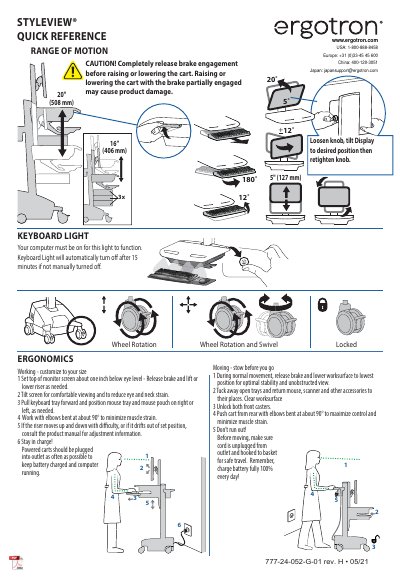

Ergotron STYLEVIEW Quick Reference - cover page
Brand
Ergotron
Category
Other Computer Accessories
Document type
Quick Start Guide
Language
English
Pages
2
File format
PDF
File size
638 KB
Published
05 November, 2026
Updated
05 November, 2026
MD5 checksum
18B96F107010D2095FF032FA2FE1AD15

About this manual

This document serves as a quick reference for the Ergotron STYLEVIEW mobile workstation. It provides essential instructions on adjusting the monitor and keyboard tray for ergonomic comfort, as well as guidelines for safely moving the cart. Key features include customizable working positions and integrated power management.

What's inside

  • Range of Motion
  • Ergonomics
  • Moving
  • Keyboard Light
  • Wheel Rotation
  • Power System
  • Battery Charge
  • Alarm Mute
  • Drawer Unlock

Frequently asked questions

How should the monitor screen be positioned for comfortable viewing?

Set the top of the monitor screen about one inch below eye level and tilt the screen to reduce eye and neck strain.

What is the recommended elbow angle when working on the cart?

Work with elbows bent at about 90° to minimize muscle strain.

How long does the keyboard light stay on automatically if not manually turned off?

The keyboard light will automatically turn off after 15 minutes if not manually turned off.

Download PDF (638 KB)

More Ergotron Manuals


View all Ergotron manuals →