
AT EN LCD KVM Switch/Console Rack Mount Kit Installation Guide

Installation guide for AT EN rack mount kits for LCD KVM switches and consoles, including compatible models and hardware steps.
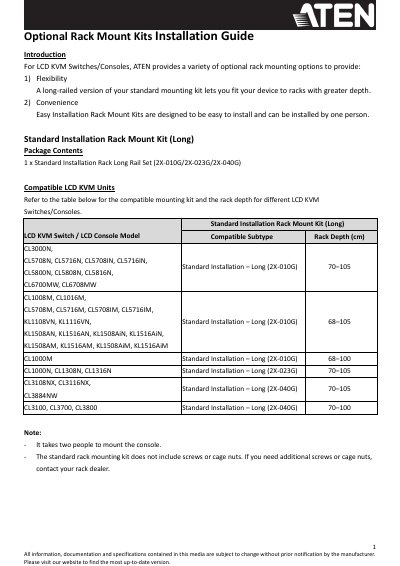

AT EN LCD KVM Switch/Console Rack Mount Kit Installation Guide - cover page
Brand
ATEN
Document type
Installation Guide
Language
English
Pages
7
File format
PDF
File size
1.3 MB
Published
05 November, 2026
Updated
05 November, 2026
MD5 checksum
1D3EAF35CE54D47804D4ACDE931C5A67

About this manual

This guide explains how to install rack mount kits for AT EN LCD KVM switches and consoles. It covers both standard and easy-installation kits, detailing compatible models and hardware components. Installation requires two people for standard kits and includes steps for securing rails, mounting brackets, and attaching the unit. Ventilation and cable clearance are specified for proper operation.

What's inside

  • Introduction
  • Standard Installation Rack Mount Kit (Long)
  • Hardware Installation – 2X-010G and 2X-023G
  • Hardware Installation – 2X-040G
  • Easy Installation Rack Mount Kits – 2K-0003/2K-0004/2K-0005/2K-0006
  • Hardware Installation (General)

Frequently asked questions

How many people are required to install the Standard Installation Rack Mount Kit?

It takes two people to mount the console.

What is the minimum clearance required at the back of the unit for the power cord?

You must allow at least 12.7 cm at the back for the power cord and cable clearance.

What screw type is included in the Easy Installation Rack Mount Kit package?

The package includes one M4*6 Type I Screw Set containing four screws.

Download PDF (1.3 MB)

More ATEN Manuals


View all ATEN manuals →