
This manual introduces the basic operations of the camera, including installing the battery, inserting the storage card, taking pictures, recording videos and playing back photos
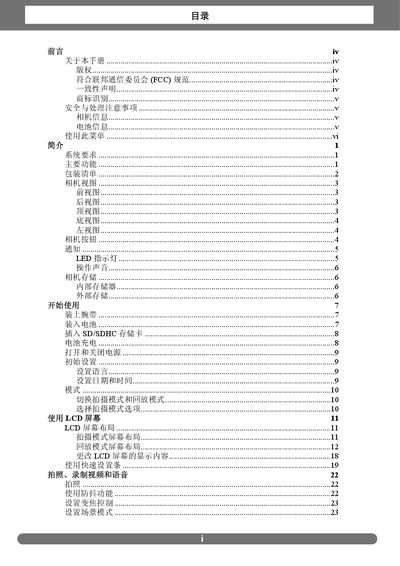
The guide explains how to safely use the camera, including handling precautions, battery installation, and environmental limits. It describes the main functions such as shooting modes, playback, LCD operation, and connectivity options like USB and PictBridge.
The document also lists technical specifications, including sensor size, resolution, optical zoom, ISO range, supported memory cards, LCD size, operating temperature, and dimensions. These details help users understand the camera's capabilities and configure settings for different shooting scenarios. This manual is written in Chinese.
| Sensor | 12 MP CCD, 1/2.3 inch |
|---|---|
| Still Image Resolution | 12 MP (4000 × 3000) |
| Optical Zoom | 3× optical, 5× digital |
| LCD Size | 3.0 inch color LCD |
| Memory Card Support | SD up to 4 GB, SDHC up to 16 GB |
| Internal Memory | 32 MB |
| Operating Temperature | 0 °C – 40 °C |
| Weight | 130 g (without battery and SD) |
Use the mode switch to select either shooting mode or playback mode.
The camera supports SD cards up to 4 GB and SDHC cards up to 16 GB.
The camera has a 3.0‑inch color LCD display.