
This document describes how to use the camera, including macro, screen, storage card, view and delete photos/video clips, driver, download photos/video clips, etc.
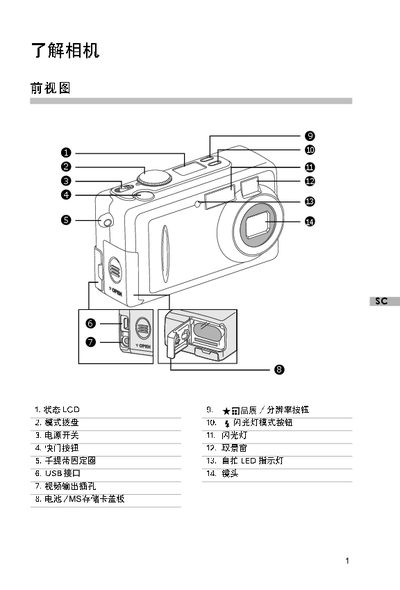
The guide introduces the camera’s main components such as the LCD, mode dial, power switch, shutter button, flash, and USB port, and shows how to install the battery and memory card. It then details the steps for turning the camera on, selecting shooting modes, taking photos, and using the LCD or viewfinder.
Additional sections cover how to review and delete photos or video clips, transfer files to a PC via USB, and configure flash modes and other settings such as resolution and battery status indicators. This manual is written in Chinese.
| Maximum photo resolution | 600 x 1200 pixels |
|---|---|
| Minimum photo resolution | 800 x 600 pixels |
| Internal memory | 8 MB |
Slide the POWER switch to the ON position.
Connect the camera to the PC with a USB cable, turn the camera on, then open the removable disk on the computer to copy files.