
This document introduces the features and characteristics of camera products under Windows and Macintosh operating systems, as well as the methods of connection and usage with computers.
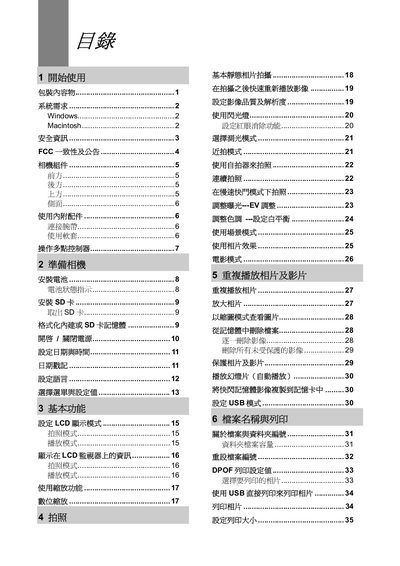
This manual guides users through the initial setup of the camera, including inserting and formatting the SD card, powering on the device, and configuring date and time. It also explains basic functions such as LCD display modes, shooting modes, playback, zoom, and image quality settings.
Further sections cover connecting the camera to a computer via USB, installing the supplied software for Windows and Macintosh, printing images directly from the camera, and detailed troubleshooting steps for common issues like battery problems, USB connectivity, and SD card errors. This manual is written in Chinese.
| Resolution (Maximum) | 5.36 Megapixels |
|---|---|
| Sensor Size | 2.5 inch |
| Lens Focal Length | 5.9‑f17.17 mm |
| Optical Zoom | 3× |
| LCD Display | 2" TFT LCD |
| Image Resolutions | 2592×1944, 2304×1728, 1600×1200, 640×480 |
| ISO Sensitivity | ISO 100‑800 |
| Shutter Speed | 1/2000 s – 8 s |
| Battery Type | 2× AA |
| Dimensions (W×H×D) | 92.1 mm × 62.1 mm × 35.5 mm |
| Weight (without battery) | 160 g |
| Operating Temperature | -5 °C to 40 °C |
| Storage Temperature | -20 °C to 60 °C |
Check that the batteries are inserted in the correct orientation and that they have sufficient charge; replace or recharge the batteries if needed.
Install the USB driver software before connecting the camera to the computer, then reconnect the USB cable.
Format the SD card in the camera using the format function, or replace the card with a new, compatible one.
Use only the recommended power accessories and avoid using non‑approved power supplies, as they can cause overheating and fire hazards.