
This document is the user manual for the SC-2000 handheld terminal. It introduces the functions, operation methods and precautions of the handheld terminal.
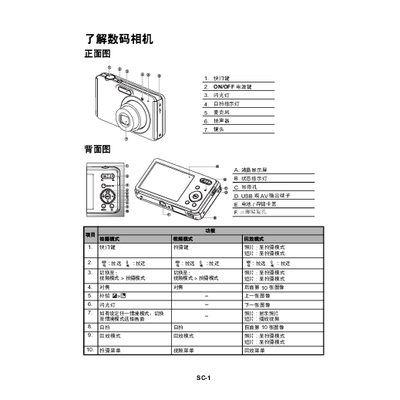
The manual introduces the digital camera’s basic operation, including turning the device on, selecting shooting modes, focusing, and adjusting exposure. It also describes how to use the 2.7‑inch TFT color LCD for composition and menu navigation.
Additional sections cover video recording at various resolutions, playback controls, deleting images, transferring files to a computer via USB, battery charging procedures, FCC compliance notes, and a troubleshooting guide for common issues such as battery charging problems and file‑transfer errors. This manual is written in Chinese.
| Display | 2.7‑inch TFT color LCD |
|---|---|
| Internal Memory | 32 MB (expandable via SD/SDHC) |
| Video Resolutions | 320×240, 640×480, 720 p |
| Battery Indicator | Red light when fully charged |
| USB Interface | USB connection for data transfer and charging |
Press the ON/OFF key to power the camera on.
Connect the camera to the computer with a USB cable, select PC mode, then copy files from the DCIM folder.