
This document is a user manual that provides instructions and precautions for using the CASIO watch. The watch features timing functions and a thermometer.
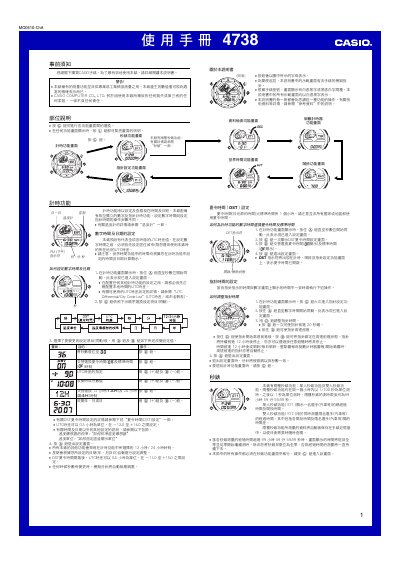
This manual provides step‑by‑step instructions for setting the digital and analog time, configuring UTC offsets, selecting cities for world time, and adjusting daylight‑saving settings. It also covers the operation of the stopwatch (single‑ and dual‑person modes), timer, alarm, and automatic illumination.
Additional sections describe the temperature sensor, its calibration, unit selection, and safety warnings, as well as memory management for storing up to 50 stopwatch logs. The document includes reference data such as UTC differential tables and button‑sound settings. This manual is written in Chinese.
| Display type | EL (electroluminescent) panel |
|---|---|
| Temperature measurement range | -10.0 °C to 60.0 °C |
| Temperature resolution | 0.1 °C (0.2 °F) |
| Memory capacity | 50 stopwatch records |
| Stopwatch maximum time | 99 h 59 min 59.99 s |
| Timer range | 1 min to 100 h |
While on the time screen, press and hold the D button for about 3 seconds to toggle automatic illumination on or off.
The watch can store up to 50 stopwatch records in its internal memory.