
This manual is a user guide for watch 3031 1 MA0605-ChA. The watch has various functions, including timer, world time, and stopwatch. Users can set and operate the watch according to their needs. The display screen of the watch can be set to white background with black text or black background with white text. The manual provides detailed instructions and technical information.
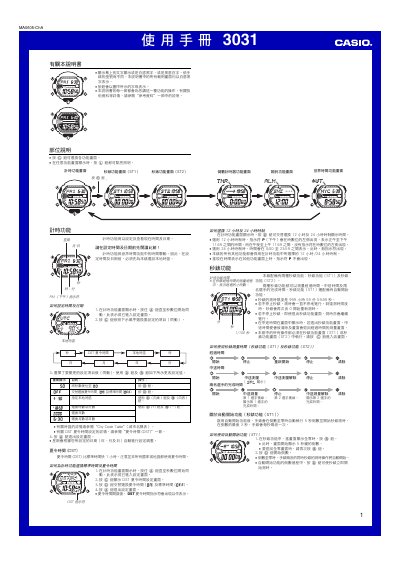
This manual provides step‑by‑step instructions for operating the Casio 3031 watch. It covers setting the time and date, configuring daylight‑saving time, selecting 12‑hour or 24‑hour display, and using the automatic illumination feature.
Additional sections describe the stopwatch (ST1/ST2), countdown timer, multiple alarm types, world‑time city selection, flash alert, button‑press sounds and safety warnings for the illumination functions. This manual is written in Chinese.
| Stopwatch maximum timing | 999 h 59 min 59.99 s |
|---|---|
| Year setting range | 2000‑2099 |
| Illumination duration options | 3 s or 5 s |
From the time‑keeping screen, hold the A button until the seconds digits flash, then use the C, D and B buttons to select and change the desired fields.
While on the time‑keeping screen, hold the B button for about 3 seconds to toggle the automatic illumination on or off; an indicator appears when it is active.
Enter the countdown timer screen, then hold the A button until the start time flashes; use C to select the field and B/D to adjust the value.