
The Dell Wyse 5000 Series Thin Client Wyse 5060 Quick Start Guide provides instructions on how to install the stand, connect the keyboard and mouse, connect the power cable and press the power button, connect the display and press the power button, and connect the network interface.
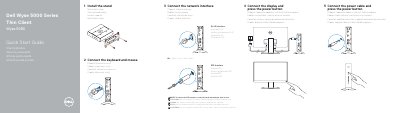
This Dell Wyse 5060 Quick Start Guide provides initial setup instructions for the Wyse 5060 thin client. It covers installing the stand, connecting the keyboard and mouse, attaching the power cable, connecting the display, and connecting the network interface.
The guide also lists product features such as USB ports, DisplayPort, headset port, and optional wireless and SFP interfaces. It includes regulatory information, model identifiers, and links to Dell product support and manuals.
| USB 2.0 ports | 2 |
|---|---|
| Wireless antenna port | optional |
| Power port | +19V |
| USB 3.1 Gen 1 ports | 2 |
| Network port | 10/100/1000 Base-T (optional) |
| SFP interface | optional |
| Power button and light | included |
| Product information tag | included |
Connect the display and press the power button.
Yes, the SFP interface is optional.
See Product support and manuals for dell.com/support and dell.com/support/manuals.