
Dell Display Manager is a Windows application that can be used to manage one or more monitors.
Dell Display Manager is a Windows application designed to manage a single monitor or a series of monitors. It allows users to manually adjust image settings, set automatic configurations, manage power, arrange windows, and rotate images on specific Dell models.
The software runs automatically upon system activation, appearing as an icon in the notification area. Users can access the Quick Settings dialog to adjust brightness, contrast, and screen resolution, or use the advanced interface for basic functions and automatic mode configurations.
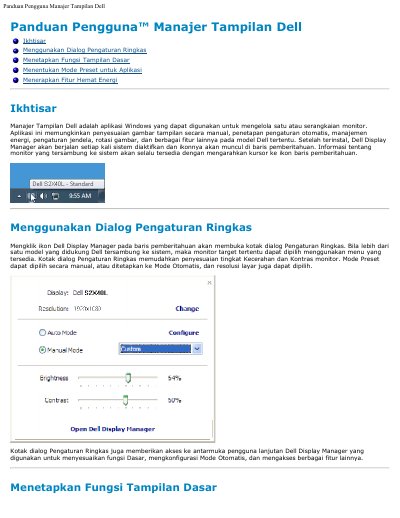
The Quick Settings dialog allows for the adjustment of monitor brightness and contrast levels, manual or automatic selection of Preset Modes, and screen resolution selection.
Automatic Mode automatically applies a specific Preset Mode when a linked application becomes active.
PowerNap is an energy-saving feature that can automatically set monitor brightness to minimum or switch the monitor to sleep mode when the screensaver is active.