
OptiPlex 3240 All-in-One Quick Start Guide
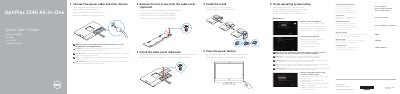
This multilingual quick start guide covers initial setup of the Dell OptiPlex 3240 AIO: connect power and other devices, remove and install the cable cover, install the stand, press the power button, and finish operating system setup for Windows 8.1, Windows 7, or Ubuntu.
It also identifies the computer's front and rear components and ports, lists features, and directs users to the Owner's Manual and Dell support for more information.
| Optical drive | Included |
|---|---|
| USB connectors | USB 3.0 and USB 2.0 |
| DisplayPort connector | Included |
| HDMI-out connector | Included |
| Network connector | Included |
| Memory card reader | Included |
| USB 3.0 connector with PowerShare | Included |
See the documentation that shipped with the wireless keyboard or mouse.
See the Owner's Manual at dell.com/support.
Follow the instructions on the screen to finish setup.