
Dell XPS M1530 Computer Setup Guide

The Dell computer user manual includes safety precautions, battery charging, and power connection.
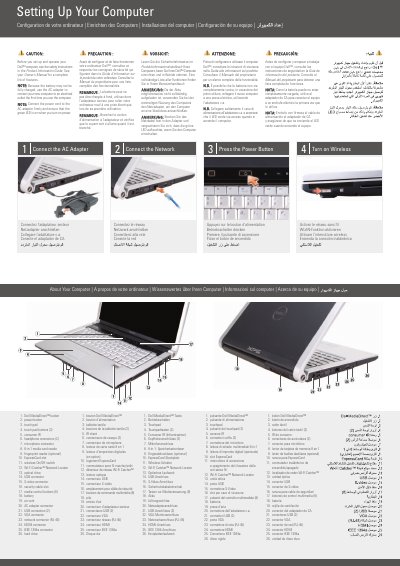

Dell XPS M1530 Computer Setup Guide - cover page
Brand
DELL
Category
Laptops
Document type
User Manual
Language
English
Pages
2
File format
PDF
File size
792 KB
Published
25 November, 2023
Updated
25 November, 2023
MD5 checksum
AA68553AB63CFA32F9B0C9F32540BEE0

About this manual

This document provides instructions for setting up a new Dell XPS M1530 computer. It includes safety precautions, such as ensuring the AC adapter is connected and the green LED is on before first use. The guide also identifies key hardware components like the Dell MediaDirect button, fingerprint reader, and various ports.

What's inside

  • Setting Up Your Computer
  • About Your Computer
  • Connect the AC Adapter
  • Connect the Network
  • Press the Power Button
  • Turn on Wireless
  • Wireless Network (Optional)

Specifications

Document Copyright2007–2008
Document Part Number0RU345A02

Frequently asked questions

What should I do the first time I use the computer?

Use the AC adapter to connect the new computer to an electrical outlet because the battery may not be fully charged.

How do I verify the computer is receiving power?

Connect the power cord to the AC adapter firmly and ensure that the green LED is on.

Download PDF (792 KB)

More DELL Manuals


View all DELL manuals →