
The Dell computer setup guide describes how to connect the keyboard and mouse, connect to the network, connect the modem, connect the power cords, and connect the monitor.
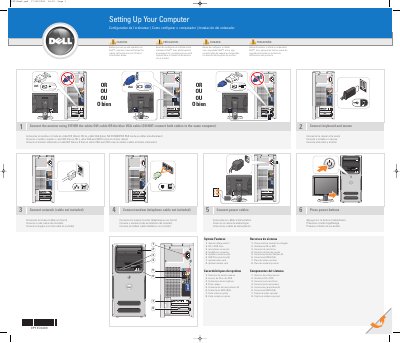
This Dell computer setup guide gives step-by-step connection instructions for a computer. It covers connecting the monitor with either DVI or VGA, the keyboard and mouse, network and modem cables, power cables, and pressing the power buttons.
The guide also lists system features such as a CD or DVD drive, microphone and headphone connectors, speaker connectors, USB 2.0 connectors, and optional video and modem cards. It includes optional wireless network and Media Center setup notes and points to the Owner's Manual for more information.
| USB 2.0 connectors | 6 |
|---|---|
| Speaker connectors | 6 |
| Optical drive | CD or DVD drive |
| Video card | Optional |
| Modem card | Optional |
Use either the white DVI cable or the blue VGA cable, but do not connect both cables to the same computer.
Read and follow the safety instructions in the Product Information Guide.
See the Owner's Manual; if you do not have a printed copy, you can view it online by clicking the Owner's Manual icon on the desktop.
The optional Media Center operating system can be launched.