
The Dell OptiPlex 3020M/9020M Quick Start Guide provides information on how to set up and use the Dell OptiPlex 3020M/9020M computer.
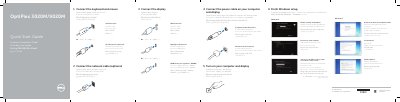
This guide shows how to connect the keyboard and mouse, network cable, display, and power cable, then turn on the computer and complete Windows setup. It also covers enabling security and updates during setup.
The second page identifies the computer's external features and connectors, lists product support resources, and provides regulatory model and type information for both models.
| Regulatory model (3020M) | D08U |
|---|---|
| Regulatory model (9020M) | D09U |
| Regulatory type (3020M) | D08U001 |
| Regulatory type (9020M) | D09U001 |
Use the VGA, DisplayPort, or optional HDMI connector; the HDMI connector is optional on the 9020M.
The OptiPlex 9020M.
Visit dell.com/support.
The guide lists 17 numbered features, including the power button, USB connectors, network connector, VGA connector, DisplayPort connector, and optional Wi-Fi antennae connector.