
Dell applications are located on the Start screen in Windows 8.1. You can access them by swiping down on the Start screen.
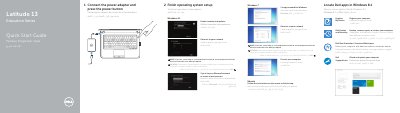
This quick start guide provides step-by-step instructions for setting up the Dell Latitude 13 laptop, including connecting the power adapter, completing Windows 8.1 setup, enabling security updates, connecting to a network, and signing in with a Microsoft account or creating a local account. It also introduces Dell applications such as Register My Device, Dell Backup and Recovery, Dell Data Protection | Protected Workspace, and Dell SupportAssist.
The guide includes a detailed features diagram labeling 21 components such as microphone, camera, USB 3.0 connectors, Mini DisplayPort, HDMI, RJ45, power connector, and status lights. Regulatory information lists the regulatory model P47G, regulatory type P47G002, and computer model Latitude -3350, with links to Dell support and regulatory compliance websites.
| Regulatory model | P47G |
|---|---|
| Regulatory type | P47G002 |
| Computer model | Latitude -3350 |
Connect the power adapter, press the power button, complete the operating system setup, enable security and updates, connect to your network, sign in to your Microsoft account or create a local account, and set up a password for Windows.
The guide mentions Register My Device, Dell Backup and Recovery, Dell Data Protection | Protected Workspace, and Dell SupportAssist.
Visit Dell.com/support, Dell.com/support/manuals, Dell.com/support/windows, or Dell.com/support/linux for product support and manuals.