
Dell Precision 7920 Tower Quick Start Guide
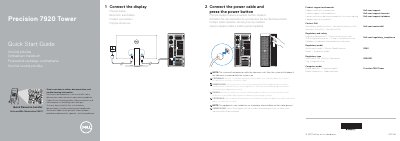
This is the two-page Dell Precision 7920 Tower Quick Start Guide, printed in English, Czech, German, Polish and Slovak. It shows how to connect the power cable and press the power button, how to connect the display, and notes that the system will not power on while the side cover is off and will shut down if the side cover is removed while the system is running. It also points to a Quick Resource Locator code for how-to videos, documentation and troubleshooting information, plus Dell support, contact and regulatory pages.
The second page is a labeled feature list of 28 numbered items covering the front and back of the computer, including the power button and power light, drive activity light, SD card slot, USB 3.1 Gen 1 ports and USB 3.1 Gen 1 Type-C ports (one with PowerShare), headset port, expansion card slots, optional 5.25-inch bay, optical drive, power cable connector, drive carriers, optional discrete graphics card slot, security cable slot and padlock ring, line-out and microphone/line-in ports, serial port, PS/2 mouse and keyboard ports, network ports, side cover and side cover release latch. The regulatory model is listed as D04X, regulatory type D04X001, and the document carries a 2017 Dell copyright line.
| USB ports | USB 3.1 Gen 1 ports (front and back) |
|---|---|
| USB Type-C | USB 3.1 Gen 1 Type-C port with PowerShare, plus a USB 3.1 Gen 1 Type-C port |
| Media card slot | SD card slot |
| Drive bays | Optional 5.25 inch bay and optical drive |
| Expansion | Expansion card slots and optional discrete graphics card slot |
| Legacy ports | Serial port, PS/2 mouse port, PS/2 keyboard port |
| Networking | Network port and optionally managed network port |
| Security | Security cable slot and padlock ring |
Connect the power cable and press the power button.
The system will not power on while the side cover is off.
The system will shut down if the side cover is removed while the system is on.
Dell lists product support and manuals at Dell.com/support/manuals.