
Dell Wyse 3000 Series Thin Client Wyse 3040 Quick Start Guide

Wyse 3000 Series Thin Client Wyse 3040 Quick Start Guide Guida introduttiva Guía de inicio rápido عيرسلا ءدبلا ليلد
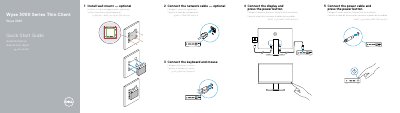

Dell Wyse 3000 Series Thin Client Wyse 3040 Quick Start Guide - cover page
Brand
DELL
Category
Other Computer Accessories
Document type
Quick Start Guide
Language
English
Pages
2
File format
PDF
File size
209 KB
Published
25 November, 2023
Updated
25 November, 2023
MD5 checksum
EE8DFD23876F0077E780590C7223BBC7

About this manual

This Dell Wyse 3000 Series Thin Client Wyse 3040 Quick Start Guide provides setup instructions for the thin client. It covers connecting the network cable, keyboard, mouse, display, and power cable, plus optional wall mount installation.

The document also lists features such as DisplayPort, USB, and network ports, and includes product support, regulatory, and safety information for the Wyse 3040.

What's inside

  • Connect the network cable — optional
  • Connect the keyboard and mouse
  • Connect the display and press the power button
  • Connect the power cable and press the power button
  • Install wall mount — optional
  • Features
  • Product support and manuals
  • Contact Dell
  • Regulatory and safety
  • Mounts

Specifications

Power adapter input+5V/+12V
DisplayPort2x
USB 2.0 port2x
Network port10/100/1000 Base-T
Lock receptacle

Frequently asked questions

Where can I find product support and manuals?

Visit Dell.com/support Dell.com/support/manuals Contact Dell.

Is wall mount installation optional?

Yes, installing the wall mount is optional.

Download PDF (209 KB)

More DELL Manuals


View all DELL manuals →