
Dell Printer Quick Installation Guide

This document is a quick installation guide for Dell printers.
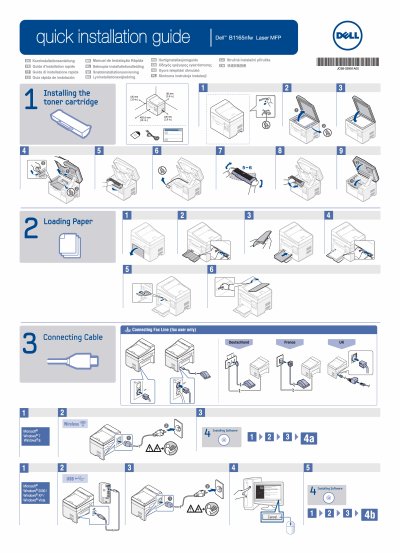

Dell Printer Quick Installation Guide - cover page
Brand
DELL
Category
Printer
Document type
Quick Start Guide
Language
English
Pages
2
File format
PDF
File size
5.6 MB
Published
24 November, 2023
Updated
24 November, 2023
MD5 checksum
A4451C04AE1F7341DC9F1207A2FE103A

About this manual

This Dell quick installation guide explains how to set up a Dell printer. It covers installing the toner cartridge, loading paper, connecting a fax line for fax users, connecting a cable, installing software on Windows 2000, XP, or Vista, and selecting a connection method. The guide also explains how to view the user's guide and download software from the Dell support website.

What's inside

  • Installing the toner cartridge
  • Loading Paper
  • Connecting Fax Line
  • Installing Software
  • Connecting Cable
  • Viewing the User's Guide
  • Select a Connection Method
  • Connecting the device
  • Ready to Print!

Specifications

Supported operating systemsMicrosoft Windows 2000, Windows XP, Windows Vista

Frequently asked questions

Which operating systems support the software installation?

The software supports Microsoft Windows 2000, Windows XP, and Windows Vista.

Who should connect the fax line?

Only fax users should connect the fax line.

Where can the software be downloaded from?

The software can be downloaded from http://www.dell.com/support.

What should be read before using the product?

The safety guidelines in the Product Information Guide should be read before using the product.

Download PDF (5.6 MB)

More DELL Manuals


View all DELL manuals →