
The Latitude 11 Education Series Quick Start Guide provides instructions on how to connect the power adapter, complete Windows setup, enable security and updates, and connect to a network.
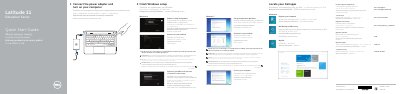
The Dell Latitude 11-3160 Computer Quick Start Guide helps you connect the power adapter, turn on the computer, and finish Windows setup. It also covers enabling security and updates and connecting to your network.
You can sign in to a Microsoft account or create a local account, locate Dell apps, and register your computer. The guide lists product features such as USB 3.0 ports, an SD-card reader, HDMI, and RJ45 ports, and points to Dell support and manuals at dell.com/support/manuals.
| Computer model | Latitude 11-3160 |
|---|---|
| USB port | USB 3.0 |
| Hard-drive activity light | Hard-drive activity light |
Connect the power adapter and turn on the computer.
Enter the password for the wireless network access when prompted.
See the Owner’s Manual at dell.com/support/manuals.
The computer model is Latitude 11-3160.