
Dell™ OptiPlex™ All-in-One Stand User Guide
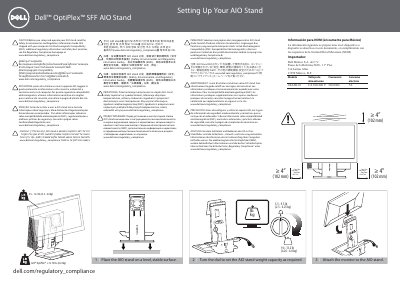
This guide covers setup of the Dell OptiPlex SFF AIO Stand. It includes safety and regulatory cautions and refers users to the Safety, Environmental, and Regulatory Information Guide shipped with the computer.
Setup instructions cover placing the stand on a level surface, setting the weight capacity dial, attaching the monitor, connecting and routing cables, sliding the computer chassis into the stand, locking the switch, and installing security accessories.
| Weight capacity | 5.5 - 13.2 lbs (2.5 - 6.0 kg) |
|---|---|
| Dell OptiPlex weight limit | ≤ 13.75 lbs (6.24 kg) |
| Minimum clearance | ≥ 4” (102 mm) |
Read the Safety, Environmental, and Regulatory Information Guide that shipped with the computer.
See the Regulatory Compliance homepage at www.dell.com/regulatory_compliance.
Slide the switch to lock the computer to the AIO stand.
Store any access cable in the cable tray.