
Huawei inverter installation guide, introduces the features and specifications of Huawei inverters, and provides detailed installation steps.
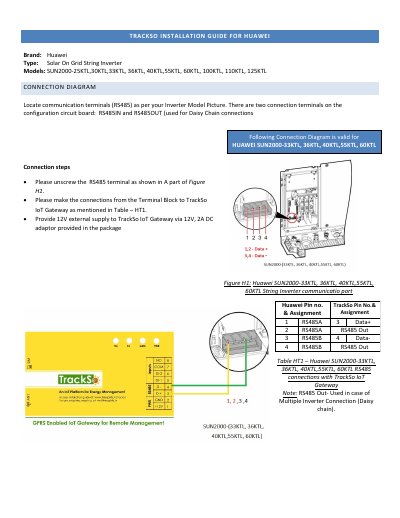
This document provides installation instructions for connecting Huawei SUN2000 series string inverters to the TrackSo IoT Gateway. It details the specific RS485 terminal connections for different inverter models, including the 25KTL/30KTL series and the 33KTL through 60KTL series, as well as the 100KTL through 125KTL series.
The guide covers the physical wiring steps, such as unscrewing terminals and connecting Data+ and Data- lines, along with the required 12V external supply for the gateway. It also explains the default configuration settings within the TrackSo IoT Gateway, including baud rate, data bits, and parity, and provides instructions for setting the inverter ID and protocol (Modbus RTU) via the Huawei SUN2000 app.
| Communication Protocol | Modbus RTU |
|---|---|
| Default Baud Rate | 9600 |
| Data Bits | 8 |
| Stop Bit | 1 |
| Parity | None |
| Inverter ID Range | 1 to 247 |
| Gateway Power Supply | 12V, 2A DC |
The default baud rate is 9600, though values of 19200 and 38400 are also supported.
Modbus RTU protocol must be selected for proper communication setup.
They should be connected in daisy chain mode, with the terminal resistor switched on for the last inverter.