
Key facts
- Manuals
- 156
- Models
- 19
- Categories
- 10
- Languages
- ZH
- Last added
- 2026-10-01
Huawei models by category
Featured Huawei manuals
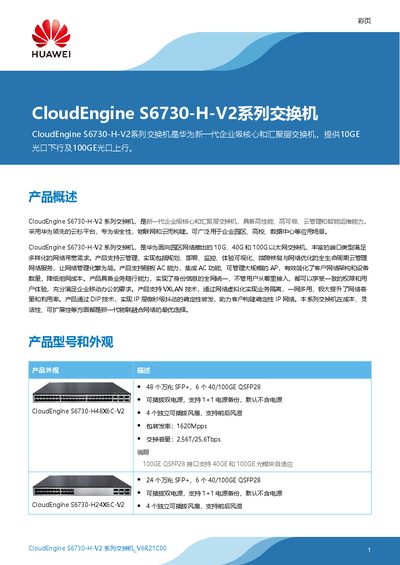
Huawei CloudEngine S6730-H-V2 Series Switch Product Leaflet
The CloudEngine S6730‑H‑V2 series is a next‑generation enterprise core and aggregation switch from Huawei. It offers 10 GE SFP+ downlink ports and 40/100 GE QSFP28 uplink ports, dual hot‑swappable power supplies, and advanced cloud‑based management for campus, data‑center and campus‑network scenarios.
Key capabilities include VXLAN virtual networking, intelligent iStack stacking, SEP and ERPS ring protection, extensive routing protocols (OSPF, BGP, IS‑IS, etc.), and built‑in security functions such as encrypted traffic analysis and threat deception. The switches also support integrated AC for wireless AP management and a programmable OPS system based on Python. This manual is written in Chinese.
Covers: Product Overview · Hardware Configuration · Performance Specifications · Network Features · Security Features · Management and Cloud Integration
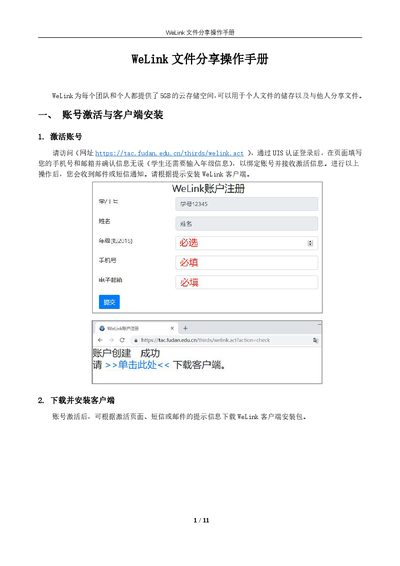
Huawei WeLink File Sharing User Manual
The guide starts with account activation, requiring users to visit the activation URL, log in via UIS authentication, and bind a phone number and email. After activation, the WeLink client can be downloaded for Windows, Android, or iOS and installed on the device.
Subsequent sections cover logging in, uploading files to personal or team spaces, sharing files via direct user invitation or link sharing, and downloading shared files on both PC and mobile clients. The mobile app can view common file formats, while unsupported formats must be accessed through the desktop client. This manual is written in Chinese.
Covers: Account Activation and Client Installation · Login Procedure · File Upload and Sharing · File Download · Mobile Client Usage
Huawei HWI-AL00 / HWI-TL00 Phone User Guide
This guide provides a comprehensive overview of the Huawei HWI-AL00 and HWI-TL00 smartphones, covering everything from basic device appearance and SIM card insertion to advanced functions such as voice assistant, gesture controls, and smart life features. It includes detailed instructions for using the camera, managing contacts, handling messages, and customizing the home screen and themes.
The manual also explains security and privacy settings, network connectivity options (including VoLTE and dual‑SIM support), and the process for system updates and recovery using Huawei Share, HiSuite, or eRecovery. Safety precautions, battery management, and backup procedures are covered to help users maintain optimal performance. This manual is written in Chinese.
Covers: Highlights · Quick Operations · Smart Life · Camera Functions · Gestures and Operations · Voice Assistant
Huawei UniSTAR SCT User Guide
This guide introduces UniSTAR SCT, Huawei’s online configuration and quoting tool. It covers the purpose of the system, the main functions such as product comparison, quotation creation, and sharing, and explains the typical ordering scenarios for distributors and VAPs.
The document provides step‑by‑step instructions for obtaining a Uniportal account, applying for SCT permissions, logging in (guest or registered user), navigating the interface, exporting and managing quotation sheets, and using additional features like product comparison and sharing. It also includes a privacy statement and contact information for local support. This manual is written in Chinese.
Covers: Introduction to UniSTAR SCT · Requesting Access · Logging into SCT · Ordering Scenarios · Product Comparison · Managing Quotations
Latest Huawei manuals
Huawei CloudEngine S6730-H-V2 Series Switch Product Leaflet
Product Leaflet 11 pages · 705 KB · ZHHuawei CloudEngine S6730-H-V2 series switches provide 10 GE downlink and 100 GE uplink with high‑performance, cloud management and extensive security features.
Huawei WeLink File Sharing User Manual
User Manual 11 pages · 1.1 MB · ZHThis manual explains how to activate an account, install the WeLink client, log in, upload, share, and download files using Huawei's WeLink cloud storage.
Huawei HWI-AL00 / HWI-TL00 Phone User Guide
User Manual 180 pages · 25.4 MB · ZHThe Huawei HWI-AL00/HWI-TL00 phone user guide explains features, setup steps, and troubleshooting for the device.
Huawei UniSTAR SCT User Guide
User Manual 59 pages · 3.5 MB · ZHThe Huawei UniSTAR SCT User Guide explains how to request access, log in, create quotes and use the tool’s configuration features.
Huawei Welink Video Conferencing System User Guide
User Manual 9 pages · 869 KB · ZHThis guide explains how to register, install, log in, join meetings and use basic functions of the Huawei Welink video conferencing system.
Huawei MC323 Mobile Terminal AT Command Interface Specification
Programming Manual 106 pages · 1.5 MB · ZHThis specification defines the AT command interface for the Huawei MC323 mobile terminal device.
Huawei eSpace Cloud Contact Center Solution Overview
Product Leaflet 10 pages · 3.4 MB · ZHThe Huawei eSpace Cloud Contact Center solution delivers scalable, on‑demand cloud contact services with multi‑channel support and flexible deployment.
HUAWEI PC Suite user manual
User manual of Huawei PC Suite
HUAWEI EC152 User Guide
The Huawei EC152 User Guide introduces the use of Huawei EC152, including system requirements, appearance, inserting microSD card, using the device, Windows XP installation steps, Mac OS installation steps, troubleshooting, care and maintenance, warnings and precautions.
Huawei B593 Quick Start Guide
This document is a quick start guide for Huawei B593 SE UK SE 6 SIM 1 2 6 3 UK 12 3. The guide provides detailed instructions on how to set up and use this 4G router.
HUAWEI FC612E Cordless Phone USER GUIDE
This document is the user guide for Huawei FC612E cordless phone. It provides information on copyright, software restrictions, and trademarks and permissions. It also mentions that certain features of the product may be limited by local network operators or service providers.
Huawei B970b Wireless Gateway Quick Setup Guide
This is a quick setup guide for the Huawei B970b Wireless Gateway, which includes information on components, connection and setup steps, and configuration operations.
HUAWEI EC156 User Guide
This document is the user guide of Huawei EC156 TATA Photon Plus USB Data Modem Device. It mainly introduces the system requirements, appearance, technical specifications, usage methods, installation steps of the device.
HUAWEI E153 WIFI CONNECTION USER GUIDE
This document is the user guide for Huawei E153 WiFi Connection, which explains the software installation and configuration steps, as well as available WiFi network settings. Huawei E153 is a WiFi connection device.
HUAWEI U7519 User Guide
HUAWEI U7519 User Guide, introduces the functions and usage methods of the mobile phone
Which document do I need?
User Manual
Day-to-day operation, settings and troubleshooting. Start here if the product is already set up.
Programming Manual
Instruction set, parameters and examples for configuring or programming the device.
Questions answered in Huawei manuals
What port types are available on the CloudEngine S6730‑H48X6C‑V2?
It provides 48 ten‑gigabit SFP+ ports and six 40/100 gigabit QSFP28 ports.
From: Huawei CloudEngine S6730-H-V2 Series Switch Product Leaflet
Can the switch be managed through a cloud platform?
The switches are compatible with Huawei’s cloud management platform for remote configuration, monitoring and upgrades.
From: Huawei CloudEngine S6730-H-V2 Series Switch Product Leaflet
How do I activate my WeLink account?
Visit the activation URL, log in via UIS authentication, enter your phone number and email (students also provide grade information), then receive an activation email or SMS.
What file types can be viewed on the mobile client?
The mobile client can view common formats such as images, documents, and videos; uncommon formats can only be shared or saved to personal space and cannot be opened or downloaded on mobile.
How do I request access to UniSTAR SCT?
Create a Uniportal account, register and authenticate on eChannel, then apply for SCT permissions through the iWCM platform for approval by a channel manager.
Which browsers are supported by UniSTAR SCT?
UniSTAR SCT supports Internet Explorer 8.0 or later, Firefox 11.0 or later, Safari 5.12 or later, and Chrome 19.0 or later.