
The Unitronics UCR-B5 router enables Unitronics PLC products to communicate via mobile networks (4G)
The Unitronics UCR-ST-B5 Router enables Unitronics PLC products to communicate via mobile networks (4G). Highlights include 1 Ethernet LAN port and 1 WAN port configurable as LAN, wireless LAN access point or client operation, embedded send/receive SMS messages directly from UniStream PLCs, and I/O with 1 digital input and 1 digital output. UniLogic SMS embedded support is noted from Ver. 1.29 and above.
The package includes the router, power cable, LTE antennas, WiFi antenna, Ethernet cable, and Quick Start Guide. Instructions cover SIM card insertion, front and back views, LED status and signal strength, powering via 4-pin connector or passive PoE through the LAN port, and mounting with the Din Rail bracket. Technical specifications list 9-30 VDC power, 2 x 10/100 Ethernet ports, 4G LTE Cat 4, dimensions 83 mm x 74 mm x 25 mm, and a -40 °C to 75 °C temperature range.
| Power voltage range | 9 – 30 VDC, 4 pin DC connector |
|---|---|
| Ethernet ports | 2 x 10/100 Ethernet ports: 1 x WAN (configurable as LAN), 1 x LAN |
| Mobile | 4G (LTE) – Cat 4 DL up to 150 Mbps, UL up to 50Mbps; DC-HSPA+; UMTS; TD-SCDMA; EDGE; GPRS |
| Dimensions | 83 mm x 74 mm x 25 mm (3.27”x2.91”x0.98”) |
| Weight | 125 g (4.40 oz) |
| Storage and Operational temperature | -40 °C to 75 °C (-40°F to 167°F) |
| Housing | Aluminum housing, plastic panels |
| Inputs | 1 x Digital Input |
It enables Unitronics PLC products to communicate via mobile networks (4G).
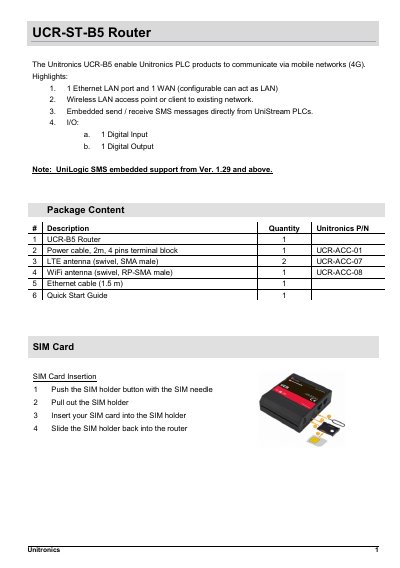
Push the SIM holder button with the SIM needle, pull out the SIM holder, insert the SIM card, and slide the holder back into the router.
Use the Din Rail bracket to mount the device.
It uses 9 – 30 VDC via a 4 pin DC connector.