
This is the Zebra HC100 wristband printer's routine maintenance guide, covering daily maintenance and cleaning of the printer.
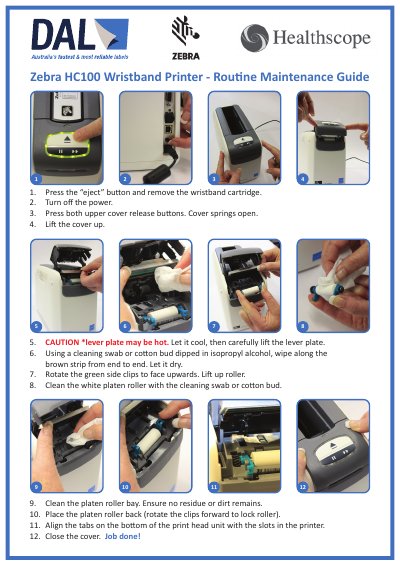
This one-page routine maintenance guide for the Zebra HC100 wristband printer walks through cleaning the printer's print head and platen roller. It starts by pressing the eject button to remove the wristband cartridge and turning the power off, then opening the cover with the two upper cover release buttons.
The guide then describes cleaning the brown strip on the lever plate with a swab or cotton bud dipped in isopropyl alcohol, removing the platen roller by rotating the green side clips, cleaning the roller and its bay, and refitting the roller and print head unit before closing the cover.
| Cleaning agent | Isopropyl alcohol |
|---|
Press the eject button and remove the wristband cartridge, then turn off the power and open the cover using both upper cover release buttons.
After the lever plate has cooled, wipe along the brown strip from end to end with a cleaning swab or cotton bud dipped in isopropyl alcohol and let it dry.
Rotate the green side clips so they face upwards and lift the roller out.
Place the platen roller back and rotate the clips forward to lock it, then align the tabs on the bottom of the print head unit with the slots in the printer and close the cover.