
LI/DS 36xx Series scanner accessories guide, including charging cradles and battery chargers
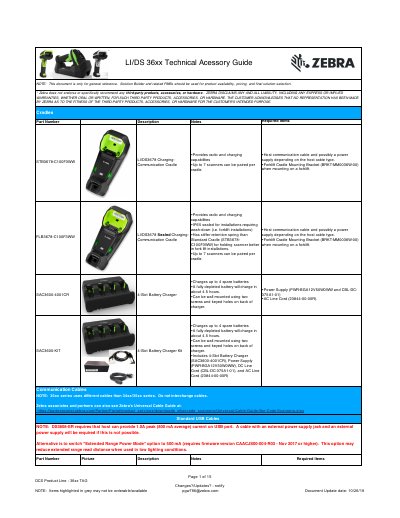
The Zebra LI/DS 36xx Series Scanner Technical Accessory Guide lists part numbers, descriptions and notes for cradles, battery chargers and communication cables used with LI/DS 36xx scanners. It covers charging-communication cradles, a 4-slot battery charger and kit, standard USB, RS232, keyboard wedge, IBM POS and vehicle-mount computer cables.
Notes state that the 36xx series uses different cables than the 34xx/35xx series and that these cables should not be interchanged. The document says it is for general reference and that Solution Builder and related PMBs should be used for product availability, pricing and final solution selection.
| Scanner pairing per cradle | Up to 7 scanners |
|---|---|
| Spare battery charging capacity | Up to 4 batteries |
| Full battery charge time with 4-slot charger | About 4.5 hours |
| USB cable current rating | 1.2 A |
| Freezer-rated cable temperature | -30 °C |
Up to seven scanners can be paired per cradle.
A fully depleted battery will charge in about 4.5 hours.
No. The guide says the 36xx series uses different cables than the 34xx/35xx series.
They are rated to -30ºC for freezer environment use.