
This manual is the startup guide for the Sony HT-A9 home theater system, which introduces the product's installation and usage methods.
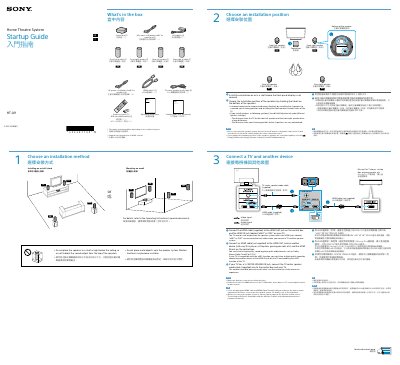
This guide walks you through installing the Sony HT-A9 home theater system, including mounting speakers, connecting HDMI cables, and powering the unit. It details how to connect your TV and other devices using HDMI and S-CENTER cables for optimal audio and video performance. The guide also covers remote control setup, sound field optimization, and initial network configuration.
After connecting all components, the system automatically configures itself. You can then listen to TV audio or audio from connected devices via HDMI inputs. Troubleshooting and detailed settings are covered in the separate Operating Instructions and Help Guide.
Connect the HDMI cable (supplied) to the HDMI OUT jack on the control box and the HDMI IN jack labeled “eARC” or “ARC” on your TV.
Turn off all devices, then turn on the TV first and the speaker system after.
A measurement sound is output for about 1 minute.
Install it on or in a shelf where the front panel display is not covered.