
This Quick Start Guide shows how to set up, transfer music, play audio, and use FM radio on the Sony NWD-E023F/E025F digital audio player.
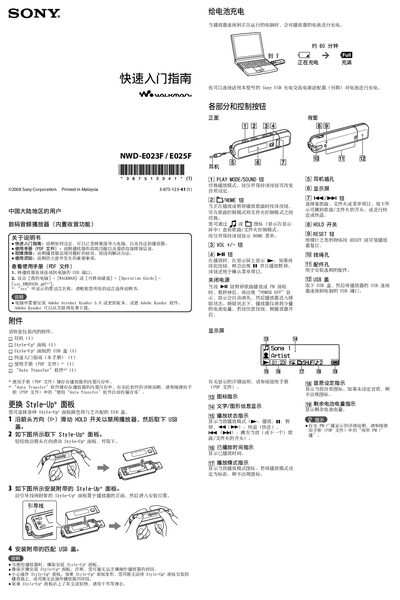
The guide provides step‑by‑step instructions for getting the Sony NWD‑E023F/E025F digital audio player up and running. It covers connecting the device to a computer, importing music, using the Auto Transfer software, and basic playback controls.
Additional sections explain how to replace the Style‑Up panel, charge the battery, listen to FM radio, and important safety and usage notes. Links to the full User Manual (PDF) are included for advanced features and troubleshooting. This manual is written in Chinese.
| Rated current | 550 mA |
|---|---|
| Internal storage (NWD‑E023F) | 1 GB (≈ 968 MB) |
| Internal storage (NWD‑E025F) | 2 GB (≈ 1.89 GB) |
| Battery charge time | ≈ 60 minutes to full |
Connect the player’s USB connector to a computer, then in Windows Explorer select the player and drag‑and‑drop files into the MUSIC folder, or use the built‑in Auto Transfer software.
From the HOME menu select FM, then go to Settings, choose FM Auto Preset, and confirm each preset number with the navigation buttons.
When the player is connected to a running computer, it takes about 60 minutes to reach a full charge.