
Ergotron LiFeKinnex WiFi Setup Guide

This guide will go through the steps to set up your product's WiFi
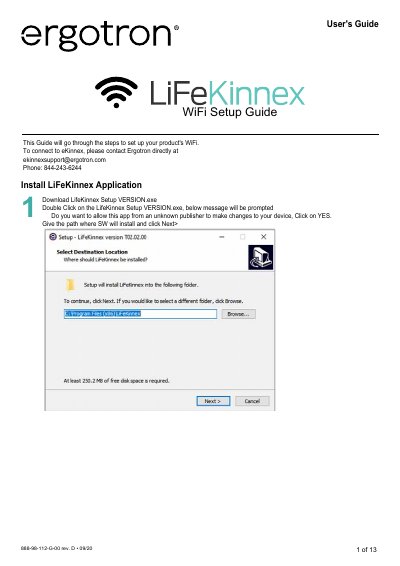

Ergotron LiFeKinnex WiFi Setup Guide - cover page
Brand
Ergotron
Category
Other Electronics
Document type
User Manual
Language
English
Pages
13
File format
PDF
File size
1.3 MB
Published
21 October, 2023
Updated
21 October, 2023
MD5 checksum
DE3E446B96FCC3B84DD236F825C8B729

About this manual

This document serves as a setup guide for the Ergotron LiFeKinnex device. It details the installation process for the LifeKinnex application software, including how to handle installation prompts and shortcuts. The guide also explains how to connect the device to a host computer via USB and verify the connection status.

What's inside

  • WiFi Setup Guide
  • Install LiFeKinnex Application
  • Connect Device to WiFi network
  • Dashboard Information
  • WIFI Configuration
  • Google Transition and Firmware Upgrade
  • Error Messages

Frequently asked questions

How do I connect the LiFeKinnex device to a host computer?

Connect the LiFeKinnex device to the host computer via USB using a Type B to Type A cable.

How do I configure the WiFi settings for the device?

Open the LiFeKinnex application, go to the Config tab, set the WIFI MODULE to ENABLED, and enter the SSID and Password.

How can I check if the device is connected?

The connection status message will display in green on the header as DEVICE CONNECTED.

Download PDF (1.3 MB)

More Ergotron Manuals


View all Ergotron manuals →