
This document is the user manual of Dymo LetraTag labeler
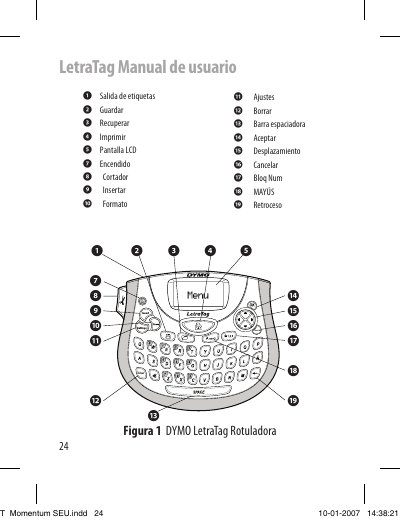
This manual provides step-by-step instructions for setting up and using the Dymo LetraTag label printer. It covers inserting batteries and label cartridges, adjusting language and date/time, creating and printing labels, and troubleshooting common issues. The guide also includes maintenance tips and environmental disposal instructions.
The printer uses AA alkaline batteries and comes with a label cartridge. It features a backlit LCD screen for editing text and formatting options like font size, style, and borders. The manual includes diagrams and key descriptions for all controls and functions. This manual is written in Spanish.
The labeler uses four standard alkaline AA batteries.
The labeler automatically turns off after two minutes of inactivity.
You can enter up to 100 characters and spaces on a single label.