
This is a document about Dymo LetraTag™ labelmaker. It introduces the features and usage methods of the label maker.
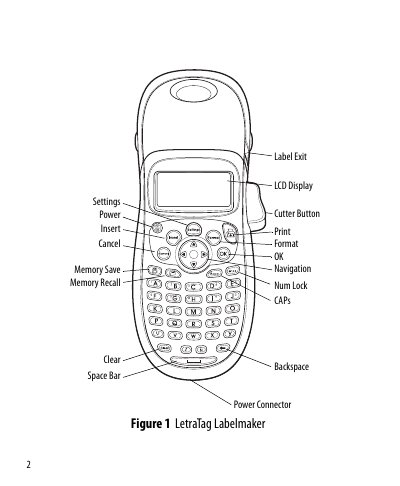
This guide walks you through getting started with the DYMO LetraTag labelmaker, including battery installation, optional AC power, and loading label cassettes. It explains how to select language, set date and time, and create your first label using the LCD display and navigation keys.
Later sections cover advanced features such as font size and style selection, memory storage for up to nine labels, routine cleaning of the cutter blade and print head, and troubleshooting common problems like low battery or poor print quality. This manual is written in Chinese.
| Power source | Four AA alkaline batteries or optional 9 V 1.5 A AC adapter |
|---|---|
| Auto power‑off timer | 2 minutes of inactivity |
| Label cassette size | 12 mm (LT) cassettes |
| Maximum characters per label | 100 characters |
| Memory capacity | Store up to nine label texts |