
The DYMO LetraTag Label Maker User Guide explains how to install batteries, load label cassettes, set language, date, time, format labels, and maintain the…
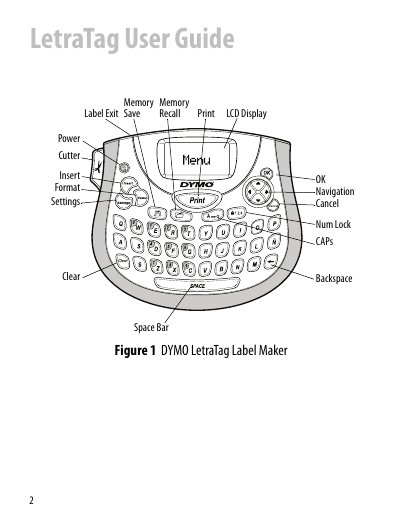
The DYMO LetraTag is a portable label maker that creates high‑quality self‑adhesive labels using 12 mm LT label cassettes. It runs on four AA alkaline batteries and features an LCD graphical display with navigation and formatting keys.
The guide covers getting started, battery and cassette installation, language and date/time setup, label formatting options, troubleshooting, and routine cleaning of the cutter blade and print head. It also provides safety and regulatory information.
| Power source | Four high‑capacity AA alkaline batteries |
|---|---|
| Label cassette size | 12 mm DYMO LetraTag (LT) cassettes |
| Maximum characters per label | 100 characters and spaces |
| Auto power‑off | After two minutes of inactivity |
Remove the battery compartment cover, insert four AA alkaline batteries following the polarity markings, and replace the cover.
Press the key, select Set Date, adjust month, day, and year with the arrow keys, then select Set Time and adjust hours and minutes.