
This is an installation guide that provides basic instructions for setting up and operating the Extron RGB 580xi.
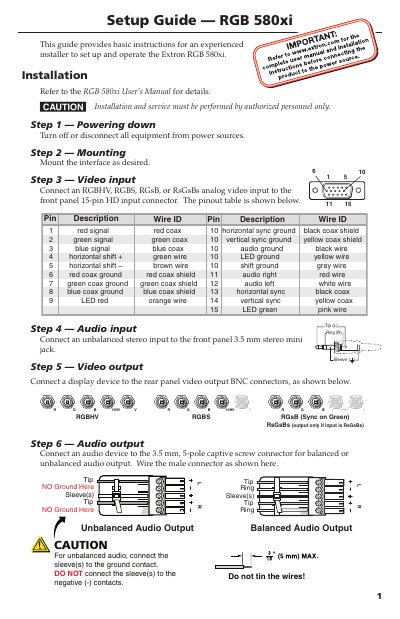
This guide provides step-by-step instructions for installing and operating the Extron RGB 580xi. It covers powering down equipment, mounting the device, connecting video and audio inputs and outputs, setting DIP switches for sync processing and output formats, and configuring RS-232 control. The guide also includes tips for adjusting video output level and peaking to compensate for signal loss over long cable runs. It references the full user manual for troubleshooting and advanced details.
| Video Input Types | RGBHV, RGBS, RGsB, RsGsBs |
|---|---|
| Audio Input | Unbalanced stereo input via 3.5 mm mini jack |
| Video Output Types | RGBS, RGBHV, RGsB, RsGsBs |
| Audio Output | Balanced or unbalanced via 3.5 mm, 5-pole captive screw connector |
| Default DIP Switch Settings | All switches set to Off (down) |
The RGB 580xi supports RGBHV, RGBS, RGsB, and RsGsBs analog video inputs.
The DIP switches control DDSP, serration pulse output, SOG, vertical sync width, sync polarity, and composite sync output.
Connect an RS-232 device to the 3-pole captive screw connector; software for RS-232 control is included with the interface.