
This user guide explains how to install, configure, and use the Extron Control for Logitech application to integrate Extron AV control with Logitech Tap and…
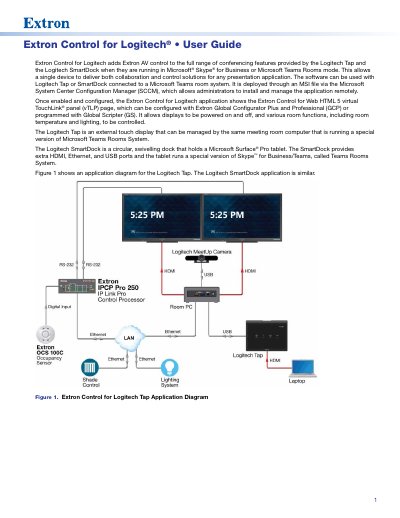
Extron Control for Logitech is a software application that integrates Extron AV control with Logitech Tap and SmartDock devices running in Microsoft Teams Rooms or Skype for Business environments. It allows a single device to deliver both collaboration and control solutions for presentation applications. The software is deployed via an MSI file and managed remotely using Microsoft System Center Configuration Manager (SCCM).
| Compatible Hardware | Logitech Tap or SmartDock |
|---|---|
| Control Processor | Extron IPCP Pro |
| GUI Designer Version | 1.11.0 or later |
| GCP Version | 3.5.1.x or later |
| GS Version | 2.2.0.x or later |
The software is deployed through an MSI file via the Microsoft System Center Configuration Manager (SCCM), which allows administrators to install and manage the application remotely.
The Microsoft Teams Rooms system requires a reboot, after which the new credentials must be entered on the Login screen.
Yes, if you reject the certificate, the tablet does not display the vTLP screens and you are returned to the Login screen.