
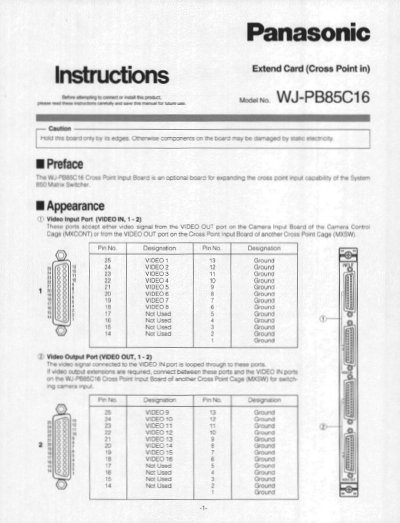
The document provides instructions for setting up the WJ-PB85C16 Cross Point Input Board, including configuring switches to designate the board number and positioning jumper connectors for various video input termination and clamping circuit functions. It details how to install additional extension boards into the Matrix Switcher Card Cage.
| Video Input Signal | 1.0 V[p-p]/75 Q composite video signal |
|---|---|
| Video Inputs | 8 inputs 25-pin D-sub connector (x2) |
| Video Outputs | 1.0 V[p-p]/75 Q composite video signal |
| Video Outputs | 8 outputs 25-pin D-sub connector (x2) |
| Front Board Dimensions | 255(W) x 250(H) x 12(D) |
| Rear Board Dimensions | 117.5(W) x 265(H) x 20(D) |
| Weight | 0.5 kg (1.1 Ibs) |
Set switches SW902 and SW903 on the board to designate the Cross Point Input board number according to the table.
The factory default setting is Board Number + (00).