
This document is a product sheet for the HDV-TX1 articulating semi-rigid probe. The probe is designed for use with the HDV600 borescope and provides warnings and specifications specific to the probe. Instructions for using the HDV600 borescope can be found in the Borescope User Guide.
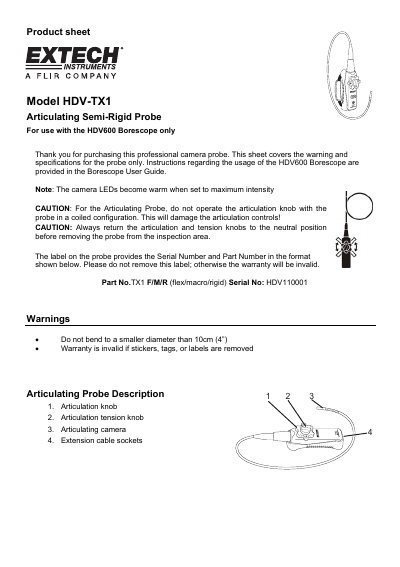
This document is a product sheet for the Extech HDV-TX1 Articulating Semi-Rigid Probe. It provides warnings regarding operation, such as avoiding coiled configurations during articulation to prevent damage, and notes that camera LEDs may become warm at maximum intensity.
The guide includes specific instructions on how to re-orient the probe if it has been twisted or stored in a way that changes its direction. Additionally, it lists key technical specifications including resolution, length, outer diameter, field of view, and operating temperature ranges.
| Resolution | 640 x 480 pixels |
|---|---|
| Length | 1m (3.3') |
| Outer diameter | 6mm (0.02") |
| Focus distance | 2 to 6cm (0.79 to 2.36") |
| Housing material | Stainless Steel |
| Field of View | 60° |
| Number of LEDs | 4 |
| Lamp Output max | 3500 Lux at 20mm |
Do not bend the probe to a smaller diameter than 10cm (4"), as this may cause damage.
Place the extended probe on a flat surface, set tension and articulation knobs to neutral/center positions, manually adjust to zero degrees, then rotate the knob clockwise or counter-clockwise to confirm orientation.