
This document is a detailed user manual for the 8755H/8916/8913H/8912H projector.
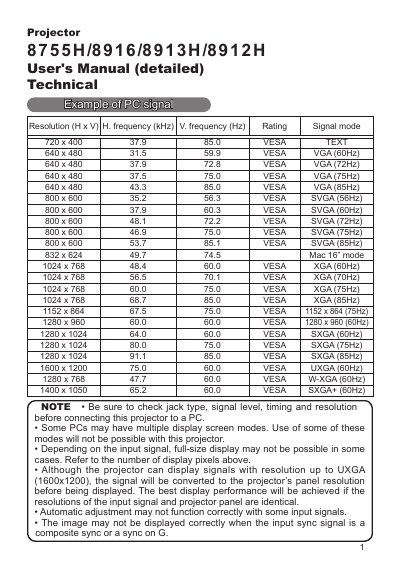
This document serves as a detailed User's Manual for the Dukane projector models 8755H, 8916, 8913H, and 8912H. It provides comprehensive technical specifications regarding supported video resolutions and frequencies, ranging from VESA TEXT to UXGA.
The guide details various input connection methods including D-sub 15-pin for RGB signals, Component Video (Y/Cb/Cr), S-Video, Composite Video, Audio inputs/outputs, SCART, USB, and RS-232C control ports. It also includes specific instructions for setting up RS-232C communication protocols and lists command codes for controlling projector functions such as MyScreen, Auto Search, and Lamp Time.
| Resolution Support | VESA TEXT to UXGA (1600 x 1200) |
|---|---|
| Audio Input Level | 200 mVrms |
| RS-232C Baud Rate | 19200bps, 8N1 |
The projector can display signals with a resolution up to UXGA (1600x1200).
Connect the CONTROL port of the projector with a RS-232C port of the computer using an RS-232C cross cable.
No, commands are not accepted during warm-up.