
This is an operation manual that introduces the use of CX-789 radio.
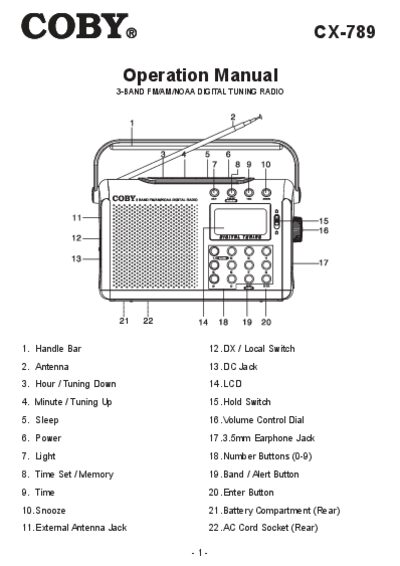
The COBY CX-789 is a portable 3‑band FM/AM/NOAA digital tuning radio with a backlit LCD, alarm functions, and a telescopic antenna for optimal reception. It can be powered by three D‑size batteries or an AC adapter.
This manual covers safety precautions, battery and AC power installation, radio operation, tuning methods, clock and alarm settings, sleep timer, antenna adjustment, technical specifications, and FCC compliance information.
| Power Source | 3 D‑size/UM‑1 batteries (DC 4.5 V) |
|---|---|
| Frequency Range (AM) | 520 – 1710 kHz |
| Frequency Range (FM) | 87.5 – 108 MHz |
| NOAA Channels | CH1 – CH7 |
| Speaker | 8 Ω 1 W |
| Power Output | 200 mW |
| Earphone Output Jack | 32 Ω |
Open the battery cover and insert three D‑size (UM‑1 or equivalent) batteries, making sure the polarity (+ and –) is correct.
Select the NOAA band to your local frequency, turn the radio off, then press the BAND / ALERT button; the LCD will show NOAA and alerts will activate.
The radio can store up to 20 preset stations: 10 for AM and 10 for FM.