
Key facts
- Manuals
- 35
- Models
- 1
- Categories
- 3
- Languages
- EN
- Last added
- 2012-08-10
COBY models by category
Featured COBY manuals
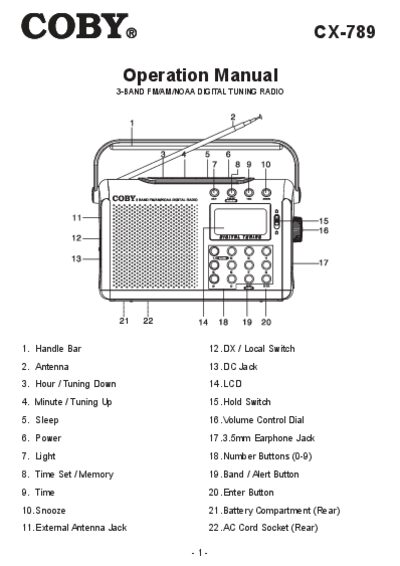
COBY CX-789 Operation Manual
The COBY CX-789 is a portable 3‑band FM/AM/NOAA digital tuning radio with a backlit LCD, alarm functions, and a telescopic antenna for optimal reception. It can be powered by three D‑size batteries or an AC adapter.
This manual covers safety precautions, battery and AC power installation, radio operation, tuning methods, clock and alarm settings, sleep timer, antenna adjustment, technical specifications, and FCC compliance information.
Covers: Precautions · Power Source · Radio Operation · Tuning · Clock/Alarm/Timer Functions · Antenna
Latest COBY manuals
COBY CX-CD400 MINI PORTABLE CD STEREO SYSTEM Manual
The CX-CD400 is a mini portable CD stereo system with AM/FM tuner from Coby. The system supports CD playing, recording, AM/FM radio, cassette playing/recording. It comes with a remote control.
COBY CV890 Manual
The COBY CV-890 Wireless Stereo Headphone System is a wireless system that allows you to listen to a program free from the restriction of a cord. It features high fidelity sound reproduction, a compact transmitter with an AC power adaptor (supplied) and comfortable Circum-aural headphones with self adjusting head band.
COBY DVD-233 Manual
Instruction Manual
COBY DP-559 Manual
COBY DVD-514 Manual
This document is the instruction manual for the DVD-514 Compact 5.1-Channel Progressive Scan DVD Player. It warns users about the risks of electric shock and fire, and provides usage precautions and servicing instructions. Additionally, it mentions that the product employs a laser system and advises against opening the enclosure to avoid laser radiation. The document also emphasizes not exposing the device to rain or moisture, and not opening the cabinet.
COBY TFTV1525 Manual
This document is the instruction manual for the TFT LCD widescreen television, including power supply, power management, and precautions.
COBY DP-758 Manual
This is the user manual of the DP-758 7-inch widescreen color TFT LCD digital photo frame of Coby Electronics Corporation
COBY DTV-102 Manual
This User Guide provides detailed information to correctly setup and evaluate the DTV-102 Converter Box. A procedure is described to setup the converter box for normal operation using the provided GUI software, with details for evaluation of the many provided features.
COBY DVD-298 Manual
This is an instruction manual for DVD-298 Progressive scan DVD/CD/CD-R/CD-RW/JPEG Player with Card Slot , USB and HDMI Ports 298SP, which introduces the features and usage of the product.
COBY MPC883 user manual
This document provides a setup guide for COBY MP3 players, including instructions on how to transfer music CDs to the COBY MP3 player using Windows Media Player 11 and common troubleshooting solutions.
COBY DP860/862 Manual
This manual introduces the functions and usage methods of COBY DP860/862 8-inch widescreen digital photo frame.
COBY MID7005-4G Manual
How to fix Coby Internet Tablet Appslib error message
COBY MID7015-4G Manual
This manual introduces the features and characteristics of the Coby Kyros MID7015-4G tablet, including how to use the touchscreen, connect to the internet, and install applications.
COBY MPC945 user manual
This is a setup guide for the COBY MPC945 player. It covers how to transfer your music CDs into your MP3 player using Windows Media Player 11, and also provides common troubleshooting solutions for your player.
COBY TF-DVD7009 Manual
This is a portable DVD/CD/MP3 player, supports 7 inch widescreen TFT LCD screen.
- 1
- 2
Which document do I need?
User Manual
Day-to-day operation, settings and troubleshooting. Start here if the product is already set up.
Questions answered in COBY manuals
How do I install batteries in the COBY CX-789?
Open the battery cover and insert three D‑size (UM‑1 or equivalent) batteries, making sure the polarity (+ and –) is correct.
How do I enable the NOAA alert function?
Select the NOAA band to your local frequency, turn the radio off, then press the BAND / ALERT button; the LCD will show NOAA and alerts will activate.