
This document introduces the use of a certain brand and model camera, including the use of menus, buttons, dials, and the operation methods of shooting, playback, and settings.
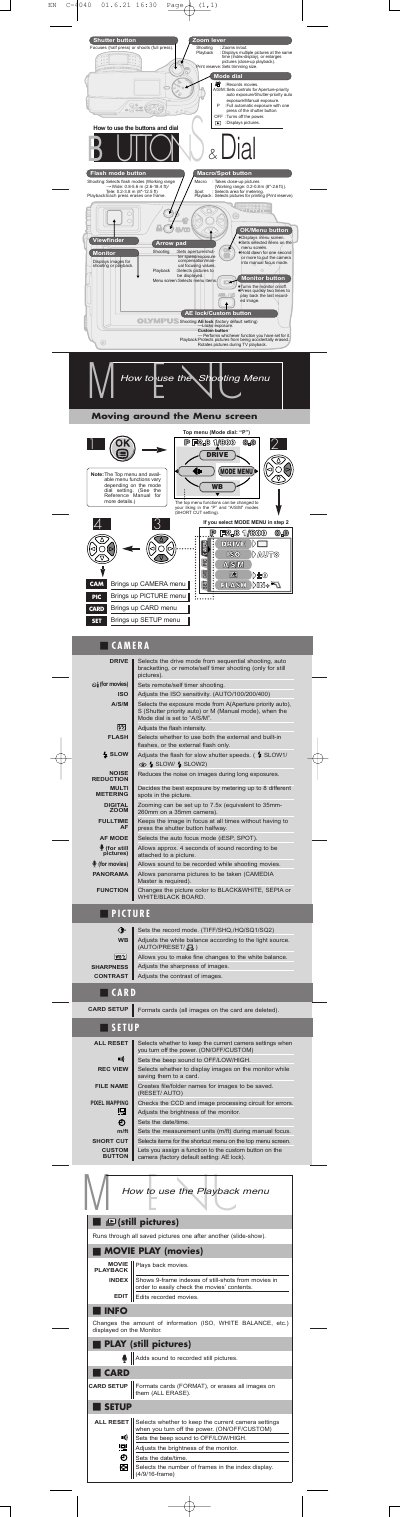
This document is the user manual for the Olympus C-4040 ZOOM digital camera. It details the functions of the camera's buttons, dials, and lever, including how to operate the mode dial for various exposure settings like Program (P), Aperture Priority (A), Shutter Priority (S), and Manual (M). The guide explains how to use the zoom lever, flash modes, and custom buttons for shooting still pictures and movies.
| Digital Zoom | up to 7.5x |
|---|---|
| ISO Sensitivity | AUTO/100/200/400 |
| Flash Working Range (Wide) | 0.8-5.8 m |
Try setting the 'P' mode on the mode dial if you are a beginner.
CR-V3 lithium battery packs (x 2), AA (R6) NiMH batteries (x 4), NiCd batteries (x 4), Alkaline batteries (x 4), or lithium batteries (x 4).