
Olympus C-7000 ZOOM Digital Camera Quick Start Guide

This document is a quick start guide for Olympus digital camera.
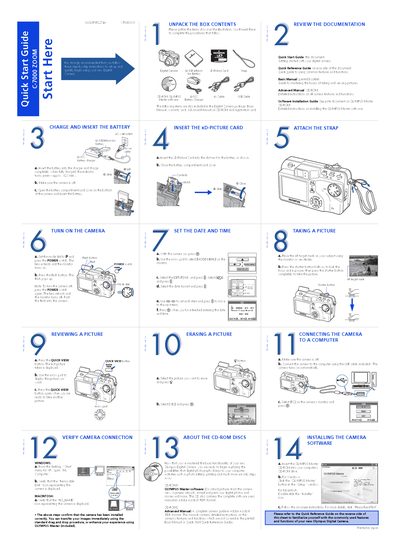

Olympus C-7000 ZOOM Digital Camera Quick Start Guide - cover page
Brand
Olympus
Category
Digital cameras
Document type
Quick Start Guide
Language
English
Pages
2
File format
PDF
File size
1.5 MB
Published
08 June, 2012
Updated
30 September, 2023
MD5 checksum
621BC807DD0886612ED388A2B0F08E50

About this manual

This document serves as a Quick Start Guide for the Olympus C-7000 ZOOM digital camera. It provides step-by-step instructions for initial setup, including charging the LI-12B battery, inserting the xD-Picture Card, and setting the date and time. The guide also covers connecting the camera to a computer to transfer images using the included OLYMPUS Master software.

What's inside

  • Unpack the Box Contents
  • Charge and Insert the Battery
  • Insert the xD-Picture Card
  • Set the Date and Time
  • Taking a Picture
  • Shooting Modes
  • Using the Zoom
  • Flash Modes
  • Image Quality Modes
  • Connecting to a Computer

Specifications

Battery TypeLI-12B lithium ion
Memory Card TypexD-Picture Card
Flash ModesAUTO-FLASH, RED-EYE REDUCTION, FILL-IN FLASH, SLOW SYNCHRONIZATION, FLASH OFF
Scene ModesPortrait, Sports, Landscape+Portrait, Landscape, Night Scene

Frequently asked questions

How long does it take to charge the battery?

It takes approximately 120 minutes to fully charge the battery.

What memory card does this camera use?

The camera uses an xD-Picture Card.

Download PDF (1.5 MB)

More Olympus Manuals


View all Olympus manuals →