
This file is about the NETGEAR WG54S5 V5 wireless router user manual, which mainly introduces the connection settings, PPPoE dialing settings, wireless network card settings, wireless security settings, etc.
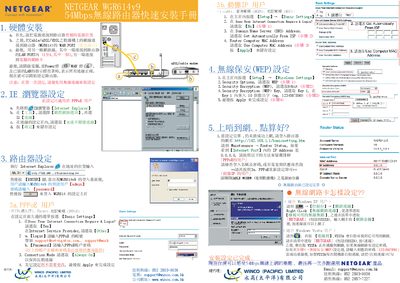
This guide walks you through connecting the Netgear WGR614v9 router, configuring the WAN (PPPoE, DHCP, or static IP) and LAN ports, and accessing the router’s web interface for basic settings. It includes step‑by‑step instructions for entering login credentials, selecting DNS options, and applying the configuration.
The document also explains how to set up wireless security, choose WEP or WPA encryption, generate a passphrase, and view router status information such as firmware version, MAC address, and IP settings.
| Model | WGR614v9 |
|---|
Open the router’s web interface, go to Basic Settings, answer the "Does Your Internet Connection Require A Login?" prompt, and enter the PPPoE username and password (or select DHCP) before applying the settings.
Navigate to Wireless Settings, choose Security Options, select WEP or WPA, set the encryption key or generate a passphrase, and apply the changes.
The Router Status page displays hardware version, firmware version, MAC address, IP address, and other status information.