
TP-Link TL-WN620G Installation Guide

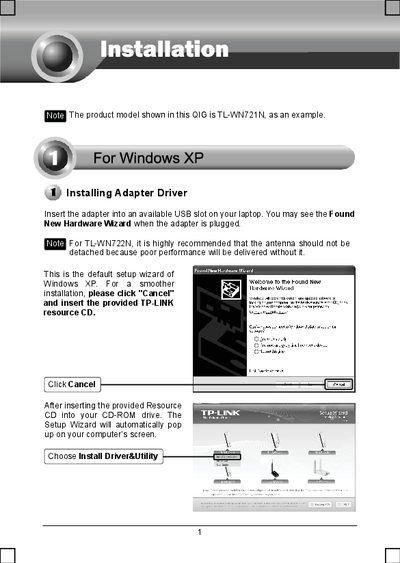
How to install TP-LINK wireless USB adapter TL-WN721N?

TP-Link TL-WN620G Installation Guide - cover page
Brand
TP-Link
Category
Other
Document type
Installation Guide
Language
English
Pages
14
File format
PDF
File size
7.9 MB
Published
08 May, 2012
Updated
30 September, 2023
MD5 checksum
47436114C5A81028D30C16344D6B96FC

About this manual

This guide walks you through installing the driver for the TP‑Link TL‑WN620G USB wireless adapter on Windows XP, Vista, and 7. Insert the adapter, run the TP‑Link resource CD, and follow the on‑screen wizard to complete driver installation.

After the driver is installed, the guide shows how to connect the adapter to a wireless router or access point, including using WPS/QSS or manually entering the network key, and how to save the network for automatic reconnection.

What's inside

  • Installing Adapter Driver
  • TP‑Link Client Installation Program
  • Connecting to the Wireless Router/Access Point
  • Wi‑Fi Protected Setup (WPS) / Quick Secure Setup (QSS)
  • Technical Support
Download PDF (7.9 MB)

More TP-Link Manuals


View all TP-Link manuals →